


Showing posts with label computer. Show all posts
Showing posts with label computer. Show all posts
Intel Unveils Its Next-Generation Core Processors

We’re here live at Intel’s press conference at the Venetian Hotel in Las Vegas, where we await the Intel team to take the stage and unveil its Sandy Bridge processors. Sandy Bridge is the codename Intel has designated for its new processor microarchitechture.
Here are my live notes from the press conference:


11:58 AM 0
5 gadget trends to watch at CES
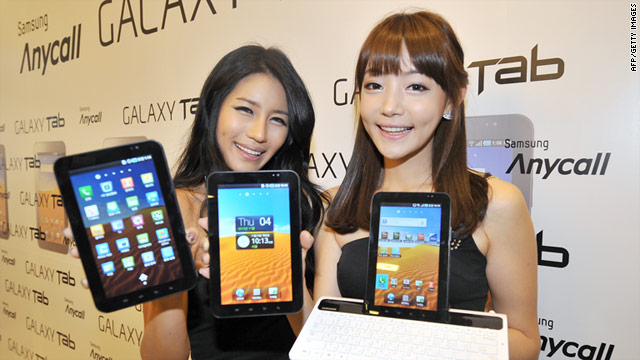
(CNN) -- For gearheads, the holiday celebrations don't end after Hanukkah, Christmas, Kwanzaa and New Year's. Many new tech toys are unwrapped not just in December but in early January, at a not-so-little event in Las Vegas, Nevada.
It's the annual Consumer Electronics Show, and it's a six-day gathering (including pre-show events and news conferences) where some 120,000 tech-industry types come to see gadget makers show off their newest wares.
CES usually brings a few surprises -- like Palm's much-hyped unveiling of the Pre phone two years ago, when the technology world thought it had its iPhone killer.
But thanks to corporate leaks, enterprising tech blogs and the hundreds of not-so-subtle e-mails flooding our inboxes, we have an educated idea of what to expect in Vegas this week.
Some of these gadget themes (the explosion of tablets) build on trends we saw at last year's CES. Others (connected appliances) appear to be emerging now. All may impact your gift-giving decisions next holiday season.
Here are five gadget trends we expect to see at this year's show.
1. Tablets
Whispers that Apple was preparing to unveil a touch-screen tablet computer dominated much of the chatter inside the Las Vegas Convention Center during CES 2010.
Attendees wanted to see tablets, and they especially wanted to see what would become known as the iPad. But Apple, a notable CES holdout, unveiled its popular tablet on its own terms -- three weeks later in San Francisco.
Instead, people at last year's CES mostly got glimpses of tablet prototypes. In his CES keynote, Microsoft CEO Steve Ballmer previewed several tablet devices, none of which have hit the market.
That will change this year as hardware makers, eager to stake a claim in a hot new gadget category, are lining up to take on the iPad. As many as 80 tablets, some perhaps running a flavor of Windows, will be showcased at CES this week, said Gary Shapiro, head of the Consumer Electronics Association.
Motorola Mobility is expected to debut its long awaited Android 3.0 tablet through a tight-knit partnership with Google. Engadget reports that Toshiba will kick off CES with its new unnamed 10.1-inch Android tablet, and Vizio, the maker of flat-screen TVs, will jump into the tablet market.
Other contenders will emerge as well. CES 2011 could bring the dark horse that narrows Apple's early but wide tablet lead.
2. Smartphones
Cell phones have long peppered CES booths, but the increasingly high-tech communication devices may have a bigger presence than ever in 2011. That's because cellular providers, which generally skip CES, will be there in full force this week.
Verizon Wireless, the top U.S. carrier, is not likely to announce a network-ready iPhone at CES. But Verizon will host a keynote and subsequent press event at which it will likely unveil smartphones compatible with its new, faster 4G data network.
Among them may be HTC's Thunderbolt, a large touch-screen Android phone, photos of which have already leaked to the Web.
AT&T and T-Mobile USA also are each holding press events in Las Vegas just before the CES show floor opens.
And Vizio didn't wait for CES to unveil an Android smartphone Monday with a 4-inch touch screen, HD video camera and a front-facing camera for video chat.
3. 3-D and internet-connected TVs
Television in three dimensions, with eye-popping visuals and bulky glasses, was all the rage at last year's CES. Attendees and the media were intrigued, but consumers have yet to embrace the expensive technology.
While 3-D will be back again this year, along with some mobile versions and sets that don't require glasses, many observers feel the technology still has a ways to go before it catches on.
So in the meantime, get ready for a wave of so-called "smart" TV sets, with built-in operating systems and software for streaming content from the internet.
Between, Apple TV, Roku, Boxee, TiVo and other so-called "set-top" devices, the idea of being able to access Netflix, YouTube and Hulu on a flat-screen in your living room is gaining traction. Google says its TV software won't have a big presence at CES, but Intel and plenty of competitors will fill those holes.
Expect new internet-connected TVs from LG, Samsung and other manufacturers.
4. Connected appliances
Beyond TVs, expect to see more unusual electronics getting outfitted with Wi-Fi or cell chips.
Cell carriers and appliance makers are pushing the idea of machine-to-machine -- that is, washing machines, refrigerators and energy readers that have the ability to access wireless data networks.
South Korean-based LG Electronics is promoting a line of home appliances that can send messages to your phone if, say, your refrigerator door is open.
Can a tweeting toaster be far behind?
5. Video gaming
Excluding a few weird, virtual-reality gizmos, video gaming is usually not a big focus of CES. Games have their time to shine in the summertime at E3, the year's big gaming show.
But gadgets are becoming a bigger part of mainstream console play, thanks to the recent excitement over gaming systems that react to players' motions instead of buttons on a controller. Microsoft and Sony are expected to showcase their Kinect and PlayStation Move, respectively at their massive CES booths.
Even Nintendo, which usually skips CES entirely, has reserved meeting rooms to privately demonstrate its hand-held 3DS device, which displays games in 3-D and is expected to hit U.S. stores in March. No glasses are needed, but let's hope the device doesn't mess with our eyes.
3:27 AM 0
Lenovo LePad 10-inch Android tablet graces CES… again

Lenovo has announced that its LePad Android tablet device will be released in 2011, with the company showing the tablet off at CES Unveiled 2011.
The French sounding LePad gave all of us journalists a serious case of deja vu at this year’s CES Unveiled, because we last saw the LePad at CES 2010 – it was called the Lenovo U1 then.
A year later, however, and the Lenovo LePad is back and will be launching in 2011 – with TechRadar seeing the device in the flesh in Vegas this week.
The tablet device runs on Android and has a 10.1-inch 800 x 1280 capacitive touchscreen display.
Underneath the hood is Qualcomm’s 1.3GHz Snapdragon processor and the tablet comes with Bluetooth, Adobe Flash 10.1 support, a front-facing camera, 3G connectivity and Wi-Fi.
It weighs around 1kg.

The Lenovo LePad comes with the added bonus of having its very own dock that turns the device into a fully functioning laptop with QWERTY keyboard.

The LePad will come to China first (Lenovo missed a trick not launching it in France initially) and will be out in the UK in 2011.

There is no UK release date for the Lenovo LePad just yet but it will be priced at around $520, so it looks like it will cost similar to its main rival – the iPad.
3:01 AM 0
First look: Asus Eee Slate review and Eee Pad review

The four tablets Asus showed off at CES today aren’t just unusual form factors; they’re also packing in performance.
Asus Eee Pad MeMO
The 7-inch Eee Pad MeMO is a fairly standard Qualcomm Snapdragon-based 7-inch Android tablet, but like all Asus’ Android tablets it’s running Honeycomb and it comes with a capacitive stylus and a Media Note application you can use for handwritten notes. It also has a MeMIC ‘media phone extender’ (which we’d usually call a stereo headset) and a price tag between $499 and $699 when it comes out in June.

If you want a 10-inch Android slate, Asus thinks you want a keyboard to go with it. The Eee Pad Slider looks like various Intel concept tablet PCs of years gone by, with a keyboard that slides out from under the screen. But it still weighs in at just under two pounds and less than two-thirds of an inch thick.


Asus Eee Slate EP121
But Asus is also bringing out a 12-inch Windows tablet and unlike all the Atom-based tablets that are appearing, the Eee Slate EP121 has a mainstream processor in it; for $999 you get a Core i5 CPU, 64GB SSD, 2 megapixel webcam, HDMI – and a Wacom digitiser pen that means we could actually use the handwriting recognition built into Windows 7 Home Premium to write and send emails (plus an optional wireless Bluetooth keyboard).

2:38 AM 0
HANDS-ON: Unique iPad Case Unfolds Into an Elegant Stand

Its name is Ori, a hat-tip to the Japanese paper-folding art of origami; and its clever design lets it morph from a shiny shell into a stand that holds an iPad upright.
When we laid hands on this beauty tonight at CES 2011, it felt strong and sturdy, unfolding into a variety of configurations quite easily.
Available next week, Ori is a $79.95 case that doesn’t feel as pleasant to hold in your hand as leather but is strong enough to protect your iPad from serious dings. We especially like its utility as a portable stand that holds the iPad up like a mini-monitor.
Another innovative idea from Joby is the $50 Yogi, attaching some of the company’s bendable legs commonly used in its signature tripods for an iPad stand that would be great in the gym or in the car (backseat only, please). True to its name, it can bend into all sorts of strange positions, allowing you to place that iPad in places you never thought it would go.
Take a look at both of these clever innovations in the gallery:


Source :Mashble
1:47 AM 0
ASUS Unveils New Tablets With Physical Keyboards At CES 2011
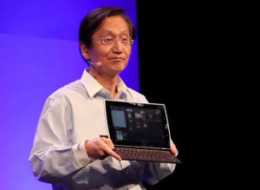
The 4 new tablets come in a few different shapes and sizes, including 2 models with physical keyboards, and the MeMO, which is similar in size to Samsung's Galaxy tablet.
The Eee Pad Slider and Transformer are ASUS's head-turners, both featuring QWERTY keyboards and Tegra-2 processors. The Slider (pictured above) has a unique design with a fold-out keyboard. Both tablets feature HDMI ports, front and back facing cameras, and will run Google's Honeycomb Android OS.
The Transformer will cost between $400 and $700 and the Slider from $500 to $800, according to Engadget. Both should be released in April or May.
The Eee Slate EP121 tablet hasn't been a secret, according to Engadget, but attendees got to see it in person today. The stylus-equipped 12" tablet (the Slider and Transformer come in at 10.1"), has a Core i5-470M processor, 2 to 4GB of RAM, and a 64GB SSD, but most importantly runs Windows 7. It should run around $1,000 and be released early this year, according to Engadget.
The MeMO features only a 7" screen, but packs a dual-core 1.2GHz Qualcomm 8260 processor and dual camera. ASUS is heralding it as a cross between and iPad and a smartphone, as it will feature "MeMic," a communications tool. It will also run Google's yet-to-be-releases Android 3.0 (Honeycomb).
The MeMo will likely start at $499, and debut in June, according to Engadget.
Story continues below
More on ASUS's new releases from Engadget:
Eee Pad Slider and Transformer
Eee Pad MeMO Tablet
Eee Slate EP121
1:15 AM 0
The Year in Computing

Google started the year by showing off the most powerful smart phone yet (Google Reveals its New Phone) and ended it with a personal computer that relies entirely on the Web, by way of Chrome OS (The Browser Takes All).
Another new category of computers grew out of the industry's obsession with adding computing power to television. Google's ambitious but troubled effort (Google TV Faces Some Prime-Time Challenges) joined a more established apps-for-TV scheme from Yahoo (Yahoo Brings Apps to TVs) and a stripped-down entrant from Apple (Apple Shows a Facebook Rival and Apple TV 2.0). All put Web-streamed content and social networking at the heart of their strategies, trying to connect living-room viewing with online friends (Making TV Social, Virtually).
The new kinds of computers required new kinds of controls. 2010 saw enhancements to touch technology, such as a way to simulate the sensation of texture on a flat screen (Touch Screens that Touch Back) and a more powerful version of the laptop track pad (Upgrading the Laptop's Touch Pad). New physical interfaces were also introduced, such as Microsoft's technology for gestural control (Hackers Take the Kinect to New Levels) and a prototype device that the user controls by tapping a forearm (Putting Virtual Controls on Your Arm). More speculative projects showed that it's possible to control a cell phone with your eyes (Eye Tracking for Mobile Control) or brain (Mobile Phone Mind Control).
All these innovations were made possible by continuing advances in the power and compactness of computer components. One route that both Intel (Computing at the Speed of Light) and IBM (Electricity and Light in One Chip) explored was to try to overcome the limitations of electricity by developing computers that run on light instead. Another radical idea, realized by a startup, was to create chips that work with probabilities, not 1s and 0s, an approach that could speed cryptography and other statistical calculations (A New Kind of Microchip).
Meanwhile, Apple (What's Inside the iPad's Chip?) and the Chinese government (China: a New Processor for a New Market) each took chip design in a new direction. Apple is striving to make chips for the iPad that balance portability and power, and China to make computing power available inexpensively to parts of the huge country that are as yet unwired.
But while Moore's law held, exponentially increasing the computing power that can fit into a given space, our power supplies haven't improved so fast. That puts a premium on less-energy-intensive ways to use computing, and it motivated research showing that Wi-Fi on mobile devices uses much more power than necessary (How Wi-Fi Drains Your Cell Phone). Intel demonstrated that chips allowed to make more errors use significantly less power and still get the job done (Intel Prototypes Low-Power Circuits). And a way to cut the power use of desktop computers by an average of 60 percent was introduced, achieved by putting a virtual copy of a desktop computer on a cloud server (PCs that Work While they Sleep).
A relatively new feature of computers, whether these are smart phones or TVs, is the cloud—the distant servers whose ample computing resources and storage space are accessed over the Internet. The cloud seems sure to become significantly more useful. Two startups showed that the cloud can enable small devices to act like much bigger, more powerful ones (Cloud Services Let Gadgets Punch Above Their Weight). The security worries that come with entrusting all your data to others also inspired cryptographers to hone a method that could let servers work with your data without being able to read (and potentially leak) it (Computing with Secrets, but Keeping Them Safe).
Google invented a new kind of cloud service when it made rudimentary AI available to all (Google Offers Cloud-Based Learning Engine). Researchers also tackled some of the logistical challenges to cloud computing, and came up with ways to easily move desktop software into the cloud (Drag and Drop Into the Cloud) and to compare the abilities of different cloud providers (Pitting Cloud Against Cloud).
Of course, even computers that incorporate the best of these ideas are still likely to crash. Fortunately, the last year brought new ideas that may make future machines more reliable. One new system can automatically diagnose a PC's problems (Software Works Out What's Troubling a PC); another can learn computer maintenance and repair by watching how an expert tunes a system (Software that Learns by Watching). A Stanford research project showed that building chips with transistors dedicated to spotting problems can create more reliable hardware (Speedier Bug Catching).
Security flaws, too, are universal, even unto the computer systems in cars (Is Your Car Safe From Hackers?) and ATMs (How to Make an ATM Spew Out Money), both of which can be compromised remotely, researchers demonstrated. New ideas about boosting security came from other researchers who bravely installed malware on a high-performance research computer (Raising a Botnet in Captivity) and from a company that can add computer smarts to the plastic in people's wallets (A Credit Card with a Computer Inside).
1:49 AM 0
Set Up and Get to Know Your New Windows PC

After years of struggling with your old, sluggish Windows PC, you've finally unwrapped a shiny new computer. Here's how to get started tweaking your settings, installing programs, and beefing up security to keep it running like a dream.
Before you do anything, there are a few things you'll want to set up first:
- Install Microsoft Security Essentials—Let's not sugarcoat it: Because of its popularity, Windows is one of the more vulnerable operating systems, so before you do anything, you'll want to put a few security measures in place. Microsoft Security Essentials is still the best darn antivirus we've used, it's free, and it just came out with a new version boasting even more virus-killing power. Head over to Microsoft's site, download the suite, and set it to auto-scan and auto-update so you can stop fussing with it and get on to the fun stuff.
- Offload Your Computer's Bloat—Unless you built your computer yourself, it's likely the manufacturer's stuck some unsightly, unnecessary, bloated crapware on your computer that will do nothing but slow your computer down from the start. To get rid of it, download previously mentioned Revo Uninstaller and uninstall the software that shipped with your machine.
- Change Up Your Theme—Okay, so it's not entirely necessary to do this before anything else, but why stare at that bland Windows wallpaper when you could be watching a slideshow of different Ferraris as you set up the rest of your computer? Microsoft's got some great themes over at its site, and there are quite a few others floating around the net as well. If you want to take it even further, check out our guide to fully customizing your desktop. Once you've got your desktop looking awesome, it's time to get to know Windows 7.
Install Some Killer Programs

Now that you're computer's secure, speedy, and looking awesome, it's time to install some great software. Here are a few places you can find our favorite Windows programs.
- Lifehacker Pack for Windows: Our List of the Best Free Windows Downloads—Looking for the best programs to keep you connected, get you organized, and amp up your productivity? Our annual Lifehacker Pack has a one-package installer for all our favorite Windows software.
- Most Popular Free Windows Downloads of 2010—Apart from our list of essential programs, there are also some really neat pieces of software we've featured over the past year. If you want to know the cool programs everyone's talking about, our 2010 list of the most popular free Windows downloads is the place to look.
- 50 Free Apps We're Most Thankful For—This Thanksgiving, you guys voted on the best free apps around. They're notn all Windows downloads (though many are cross-platform), and it's a list to be reckoned with—so if you've still got a few holes after checking out the Pack and most popular, you're sure to find what you're looking for here.
Adjust Settings and Tweak Your System

While we've already done a handy list of the top 10 things to do with a new Windows 7 system, here are some of the other things you might want to check out to customize your new PC.
- Get to Know Windows 7's Built-In Features Inside and Out—We're pretty big fans of Microsoft's newest OS here at Lifehacker, and we've spared no expense at digging into every corner of Windows 7. Check out our complete guide to Windows 7 to get the lowdown, and make sure to master Windows 7's shortcuts and explore its underhyped features as well. We've also looked deeply into Windows 7's jumplist, library, and taskbar, and system restore features, to if you want to be a true Windows ninja, you'll want to read up on those too.
- Five Best Windows Tweaking Applications—If you just want to jump right in and start tweaking the heck out of your system, we've rounded up some of the best programs to help you do just that.
- Set Up and Use XP Mode in Windows 7—If you've got a few older programs that you need to run on your new system, Windows 7's XP Mode will keep them running like a dream. We showed you how to set it up and get your outdated software running.
- How to Run Windows, Mac, and Linux Side by Side and Pain-Free with VirtualBox—If you ever need to use software from other OSes (or just want to test other applications), you can run Windows, OS X, and Linux side by side without ever rebooting your computer. Of course, you could also dual-boot Windows 7 and Ubuntu in perfect harmony.
- How to Break into a Windows PC (And Prevent it from Happening to You)—It's unlikely you'll want to break into your shiny new Windows PC, but while you're tweaking your system, you may want to read up on how potential thieves will try to break in—and tweak your passwords accordingly.
- Make Windows Load Your Desktop Before You Log In—There's nothing more annoying than starting up your computer, stepping away for a few minutes, than having to wait for your programs to load after you log in. With a simple script, you can set your PC up to start loading your desktop before you even type in your password.
- Tweak the Heck Out of Your Registry—The Windows Registry is one of the most mysterious, yet coolest features of Windows. With a bit of knowledge and some guts, you can tweak your computer to do nearly anything you want. Our Top 10 list has all the Windows Registry tweaks you could ever want.
- The Cleverest Geeky Windows Tricks Everyone Should Know—After you've become an expert on Windows' well-known features, delve into our guide about some of the best hidden Windows tricks to make getting around the OS much faster.
- Windows Maintenance Tips: The Good, Bad, and Useless—Now that you've got your system up and running, the last step is to make sure you keep it up and running (and running fast). We rounded up all the most popular Windows maintenance tips and showed you which ones really help (and hurt) your machine.
We hope these tips have helped you get your computer up, running, and customized just the way you like it. If you're already a Windows veteran and you've got some tips that we haven't mentioned, be sure to share them with us in the comments.
2:40 AM 0
“Tron” Gaming Mouse Glows Like a Light Cycle

Not only does this ambidextrous pointing device from Razer look like some sort of implement from the far-off future; it sounds like one, too.
Tron: Legacy was the #1 movie in the U.S. last weekend, so this mouse is certain to attract the attention of fans. But will it measure up for gamers? Let’s get our hands on one.
Besides the fact that this is a wired mouse — a controversial attribute for a gaming mouse among aficionados — the one spec gamers will care most about is this mouse’s fine 5600 DPI 3.5G sensor. Its sensitivity is excellent, and its two extra buttons on each side are programmable for any function. So yes, its specs are gameworthy, though not groundbreaking.
It’s a shame that this $100 mouse has such a plastic feel to it. Its all-plastic construction feels just a little too light for my taste, and its left and right click sounds are slightly loud. Those quibbles aside, the mouse feels balanced in a medium-sized hand, and I got accustomed to it quickly.
Its claim to fame is its Disneyesque lighting and sound effects. I especially like the way the rubberized mouse wheel resembles the wheels on those Tron light cycles. And that lighting stays on all the time, except for a light blue taillight that glows only when the mouse’s laser sensor is engaged.
When you first plug it in, it makes whooshing sound effects and its lights flash, an odd routine that startled me a couple of times. Check out the video below to see and hear with that’s like. It’s fun to show that to your friends when you first get it, but thankfully, the noises can be turned off in the software controls as soon as the novelty has worn off.
The Tron Gaming Mouse is available for $100, but if you want to get the full effect, you can spend $30 more to get a set that includes a bioluminescent mat. Its most unusual characteristic is the way it displays a blue glow for a few moments wherever the mouse’s laser has shown onto it. Besides its snazzy landing-pad appearance, it has just the right amount of friction to perform as a suitable complement to the Tron mouse.
Sure, this is a Disney-licensed product that’s mostly a gimmick, but it’s a fun gimmick, and it looks way cool on the desktop. You might not want to whip this baby out at the office; but for your gaming center, it could be a suitable centerpiece for Tron fans.
2:24 AM 0


IBM Predicts Holographic Phones, Air-Breathing Batteries In Next 5 Years (VIDEO)
IBM just released their "Five in Five" predictions for 2015, a list they've been compiling since 2006. The company surveys its 3,000 researchers to narrow down the five ideas that seem most likely to gather traction.
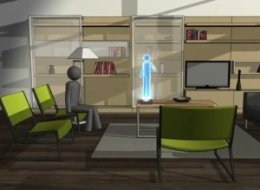
First up is Star Wars-ready holographic calling. Imagine dialing up grandma and having a 3D avatar pop up from the screen. The popularity of video chat services such as those offered by Skype and Apple's FaceTime are already priming consumers for a new kind of call. Movies and TVs are also developing the 3D technology that could enable these kinds of holographic phones.
IBM also predicts there will be batteries that will breathe in oxygen and turn out energy. Batteries will last ten times longer, an issue that moves to solve the feeble battery life of many smartphones. What's more, smaller electronics may actually be able to dispense of batteries altogether and run on static or kinetic electricity.
Energy preservation will also play a role in the use of computer heat. Right now, up to half of the energy consumed in data centers goes towards cooling computers. The heat they emit is wasted in the atmosphere. Imagine if that heat could instead be recycled to power air conditioning, or other systems.
IBM also anticipates the growth of pre-existing technologies. Though GPS plays a role in driving already, IBM envisions a far more sophisticated version which will take into account, in realtime, accidents, construction and delays on the road as well as driver patterns and behaviors. Such a system could predict congestion before it happens by calculating the numerous possible scenarios that affect traffic.
Their final prediction harnesses the power of ordinary citizens to assist scientists in their studies. People are "walking sensors" whose cars, wallets, phones, and other devices have the power to gather huge amounts of data just by wandering around the streets. Sensors pick up information about a person's environment automatically. That information could then be given to scientists who will use it to better understand the world.
Despite the science fiction flavor IBM's list exudes, these predictions are no joke to the company itself, which is engaged in an ongoing battle to anticipate what technologies will be indispensable in the future--technologies that no one has yet heard of. Last year, IBM spent $5.8 billion in research and development. In other words, the technologies they predict may be the technologies they have a hand in making a reality.
2011 marks five years since IBM's first list in 2006, which predicted we would have mind-reading phones and automatic speech translation technology by now.
Watch the video below (via YouTube):
3:24 PM 0
Firefox 4 Beta 8 Airs Today With Much Needed Bug, Performance Fixes

If Firefox 4's betas have been a vision of the future, it might just drive some to using Opera, Chrome, or Internet Explorer 9. Despite featuring a slick new look, GPU-accelerated rendering, and other nice new features (like tab stacking), Firefox 4's beta releases have been buggier than its past betas, in our experience. From flat out crashes, to NVIDIA driver failures, to hangups on common video sites like YouTube, the Firefox 4 test builds clearly are far from an acceptable release quality, and seemed to be adding more problems with each build rather than fixing them.
Thus the nature of Firefox 4 beta 8, which is set to air today, is not terribly surprising to us.
The new test build, which represents Mozilla inching towards its critical Release Candidate milestone, offers no new features, unlike past betas. Instead, the new beta is solely focused on fixing the browsers many bugs and performance issues. Among the performance upgrades include Firefox Sync setup experience; an overall speed, compatibility and functionality improvement to WebGL, and some "additional polish" to the Firefox Add-ons Manager.
To be fair Mozilla embarked upon a rather ambitious set of upgrades with Firefox 4, with GPU-based rendering perhaps being the toughest of them. The YouTube video problems clearly seemed to coincide with the introduction of this feature, so its entirely possible that Mozilla bit off more than it could chew. Firefox 4 has seen a number of delays.
On the other hand, if it cracks down and shores up quality, it may have a winner on its hands. Mozilla already has great brand recognition, owning approximately one third of the market, by some estimates. Firefox 4 has the features to be an excellent browser -- it just needs the polish to make browsing more of a joy and less of a headache.
The new beta is not yet live (the download link redirects to Firefox 4b7's download), but we'll update when it is. The release notes can be found here. The bug fixes list can be found here.
9:12 AM 0
Razer Naga Molten Special Edition Could Be the Ultimate Gaming Mouse [PICS]

If you’re not familiar with the Naga series, this $80 mouse is one of the finest, most precise mice I’ve ever laid a hand on. It’s thick and thin in just the right places, and its scroll wheel gives you just the right amount of resistance and feels butter-smooth. Its left and right mouse buttons have the perfect click-feel, and its silky surface welcomes even the sweatiest palm.
But that’s the same form factor as the current Naga mouse with its blue backlighting. This Razer Naga Molten Edition aims for the scary red look, and you can’t tell it from the pictures, but that molten lava-looking midsection glows as if it’s a breathing beast, its light fading up and down like it’s alive. While it looks hot as a two-dollar pistol, it feels cool to the touch.
Enough about its appearance, what about its functions? In addition to its two extra thumb buttons on the top left, notice the 12 macro keys right where your thumb resides, programmable to the nth degree.
Figure out what you want to have them do, and then record your actions, complete with pauses. Nothing new there, except it just works exceptionally well. If that’s not enough, download its custom interface add-ons or integrated in-game support for MMO games such as World of Warcraft, Warhammer Online: Age of Reckoning, and City of Heroes.
Why would you spend $80 on a mouse? In this case, a good reason is because the Razor Naga delivers precisely what its maker says it will: ergonomic form, maximum comfort, and the ultimate customizability. Bravo, Razer. Available January 5, 2011.


10:05 AM 0
Subscribe to:
Posts (Atom)
